USD
USD
Starting the DA98A driver in manual mode
Video on Youtube
DA98A Driver Manual Mode
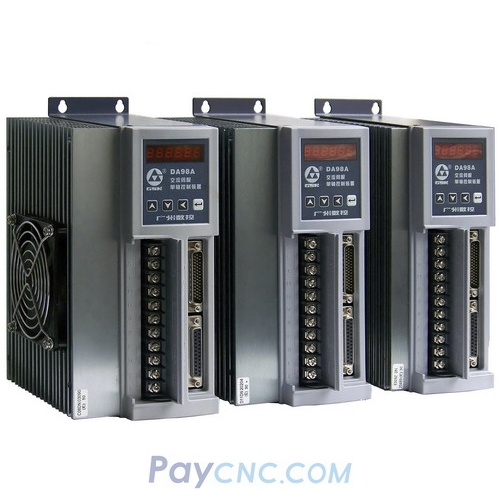
A hands-on tutorial for starting the DA98A driver in manual mode, demonstrating step by step the complete debugging process of running the motor manually without the CNC system.
The full operation steps are as follows:
First, connect the DA98A driver to 220V AC power. Wait for the panel to display "r0," indicating that the power-up is normal.
Press the shift key to find the PA parameter group, set the parameter value to 510, and confirm. This operation unlocks all hidden parameters of the driver, as it normally shows only about forty parameters by default.
Go to the PA-4 option, select manual mode, and press the confirm key.
Find the PA-21 parameter to adjust the manual running speed. The default initial value is 120 RPM, and it can be adjusted within the 100-180 RPM range according to your needs. After adjustment, confirm and save.
Switch to the PA-98 parameter, set the value to 1, and confirm to enable it. Finally, press the JR key to confirm, and the motor can run manually in forward or reverse rotation.
Da98a, da98a-10, da98a-12, da98a-13, da98a-15, da98a-20, da98a-23, da98a-30, da98a-30*, da98a-50,
Paycnc offers all DA98A AC Servo drivers.
If you could not find the exact model, you can send item photo and its nameplate to paycnc@paycnc.com or WhatsApp us to get quotation.
#da98a-10 #da98a-20
DA98A Driver Manual Mode
A hands-on tutorial for starting the DA98A driver in manual mode, demonstrating step by step the complete debugging process of running the motor manually without the CNC system.
The full operation steps are as follows:
First, connect the DA98A driver to 220V AC power. Wait for the panel to display "r0," indicating that the power-up is normal.
Press the shift key to find the PA parameter group, set the parameter value to 510, and confirm. This operation unlocks all hidden parameters of the driver, as it normally shows only about forty parameters by default.
Go to the PA-4 option, select manual mode, and press the confirm key.
Find the PA-21 parameter to adjust the manual running speed. The default initial value is 120 RPM, and it can be adjusted within the 100-180 RPM range according to your needs. After adjustment, confirm and save.
Switch to the PA-98 parameter, set the value to 1, and confirm to enable it. Finally, press the JR key to confirm, and the motor can run manually in forward or reverse rotation.
Da98a, da98a-10, da98a-12, da98a-13, da98a-15, da98a-20, da98a-23, da98a-30, da98a-30*, da98a-50,
Paycnc offers all DA98A AC Servo drivers.
If you could not find the exact model, you can send item photo and its nameplate to paycnc@paycnc.com or WhatsApp us to get quotation.
#da98a-10 #da98a-20