USD
USD
GSK980TDc Resetting Machining Count and Time
Video on Youtube
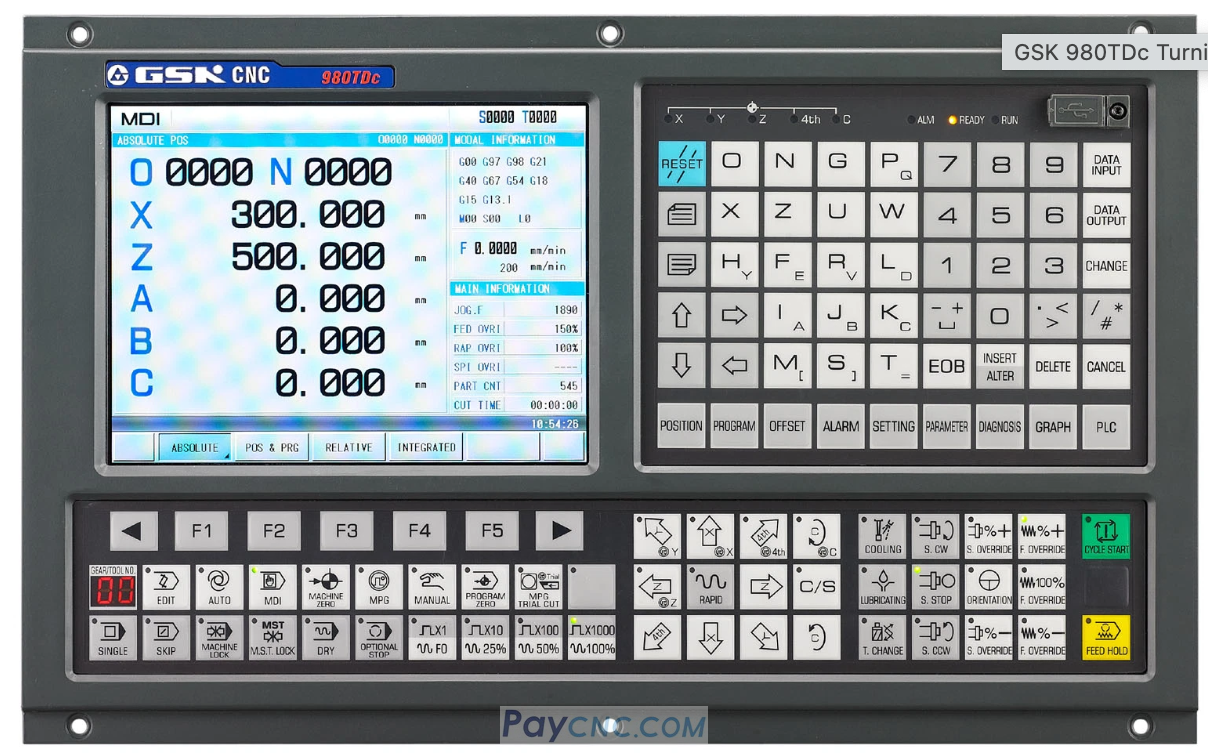
GSK980TDc CNC Control : Resetting Machining Count/Time and Setting Target Quantity
Resetting the Machining Count
While in the absolute coordinate interface (accessed by pressing the "POSITION" key), press the "CANCEL" and "N" (for "Number") keys simultaneously. The "Parts Processed" count on the screen will immediately reset to zero.
Resetting the Machining Time
Similarly, while in the absolute coordinate interface, press the "CANCEL" and "T" (for "Time") keys simultaneously. The "Cutting Time" will also be reset to zero.
Setting the Target Machining Quantity
Navigate to the "Machining Settings" interface and locate the "Maximum Machining Quantity" parameter (e.g., set to 100). Once the target value is entered, the system will automatically trigger an alert when the count reaches this specified number.
These operations must be performed while in the absolute coordinate interface (not the machine or relative coordinate interface), and the correct key combinations must be used.
Procedures may vary across different system models (such as the GSK980TDb); please refer to your specific equipment manual.
Paycnc offers different kinds of GSK cnc controllers.
If you could not find the exact model, you can send item photos and its nameplate to paycnc@paycnc.com or WhatsApp us to get quotation.
#GSKCNC #controller
GSK980TDc CNC Control : Resetting Machining Count/Time and Setting Target Quantity
Resetting the Machining Count
While in the absolute coordinate interface (accessed by pressing the "POSITION" key), press the "CANCEL" and "N" (for "Number") keys simultaneously. The "Parts Processed" count on the screen will immediately reset to zero.
Resetting the Machining Time
Similarly, while in the absolute coordinate interface, press the "CANCEL" and "T" (for "Time") keys simultaneously. The "Cutting Time" will also be reset to zero.
Setting the Target Machining Quantity
Navigate to the "Machining Settings" interface and locate the "Maximum Machining Quantity" parameter (e.g., set to 100). Once the target value is entered, the system will automatically trigger an alert when the count reaches this specified number.
These operations must be performed while in the absolute coordinate interface (not the machine or relative coordinate interface), and the correct key combinations must be used.
Procedures may vary across different system models (such as the GSK980TDb); please refer to your specific equipment manual.
Paycnc offers different kinds of GSK cnc controllers.
If you could not find the exact model, you can send item photos and its nameplate to paycnc@paycnc.com or WhatsApp us to get quotation.
#GSKCNC #controller