USD

GR2000 AC Servo Drive Error AL-701
Video on Youtube
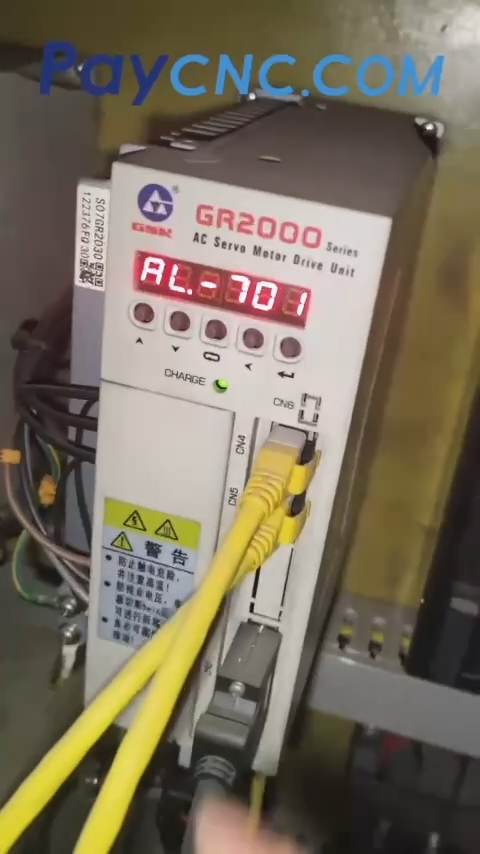
When a GSK980TB3i/GSK980TC3 CNC system is paired with a GR-series drive, an "Axis 1 Drive Warning" (or warnings on multiple axes) may occur, with the drive displaying "AL-701." This indicates that the encoder battery voltage is low. To resolve this, replace the 3.6V battery (which comes with a connector) while the machine remains powered on.
If an "Axis 1 Drive Warning" appears on the screen after startup, check the drive unit at the rear of the machine; the panel will show "AL-701." Consulting the manual confirms that this code means "encoder battery undervoltage." This is not a fault with the axis itself, but rather an indication that the battery responsible for maintaining the encoder's position data is nearly depleted.
The machine must remain powered on throughout the process—the manual explicitly states that the battery "must be replaced while the power is on." Cutting the power will result in the loss of mechanical coordinates and parameters, requiring you to re-perform tool setting and zero-point calibration.
Each drive has its own battery pack, connected via a two-wire plug. You must replace it with a new 3.6V battery equipped with the correct connector. Note that the connector specification used by GSK is unique; ensure it is oriented correctly when plugging it in—do not insert it backward.
The alarm will clear the moment the new battery is plugged in; press the "Reset" button to fully clear the error.
Checking the coordinates, you will see that the X-axis mechanical coordinate remains at the zero point, confirming that the position data has been preserved. You can resume machining immediately without needing to re-set your tools.
If one axis triggers an "AL-701" alarm, it is highly likely that the battery for another axis will also trigger an alarm within a month. It is recommended to replace the batteries for both axes while the machine is powered on.
If the drive displays an "ER-46" or "ER-49" alarm, it means the battery is completely dead. In this case, it makes little difference whether you replace it while the power is on or off; however, you will need to reconfigure the zero points, travel limits, and other settings.
Powering the machine off and back on may temporarily clear the alarm, but this is merely a stopgap measure. You can use a substitute battery (such as a 14500-type cell), provided it supplies the required 3.6V and the connector fits correctly.
Paycnc offers all kinds of GSK AC Servo Drivers.
If you could not find the exact model, you can send item photos and its nameplate to paycnc@paycnc.com or WhatsApp us to get quotation.
#GSKCNC #SERVODRIVER
When a GSK980TB3i/GSK980TC3 CNC system is paired with a GR-series drive, an "Axis 1 Drive Warning" (or warnings on multiple axes) may occur, with the drive displaying "AL-701." This indicates that the encoder battery voltage is low. To resolve this, replace the 3.6V battery (which comes with a connector) while the machine remains powered on.
If an "Axis 1 Drive Warning" appears on the screen after startup, check the drive unit at the rear of the machine; the panel will show "AL-701." Consulting the manual confirms that this code means "encoder battery undervoltage." This is not a fault with the axis itself, but rather an indication that the battery responsible for maintaining the encoder's position data is nearly depleted.
The machine must remain powered on throughout the process—the manual explicitly states that the battery "must be replaced while the power is on." Cutting the power will result in the loss of mechanical coordinates and parameters, requiring you to re-perform tool setting and zero-point calibration.
Each drive has its own battery pack, connected via a two-wire plug. You must replace it with a new 3.6V battery equipped with the correct connector. Note that the connector specification used by GSK is unique; ensure it is oriented correctly when plugging it in—do not insert it backward.
The alarm will clear the moment the new battery is plugged in; press the "Reset" button to fully clear the error.
Checking the coordinates, you will see that the X-axis mechanical coordinate remains at the zero point, confirming that the position data has been preserved. You can resume machining immediately without needing to re-set your tools.
If one axis triggers an "AL-701" alarm, it is highly likely that the battery for another axis will also trigger an alarm within a month. It is recommended to replace the batteries for both axes while the machine is powered on.
If the drive displays an "ER-46" or "ER-49" alarm, it means the battery is completely dead. In this case, it makes little difference whether you replace it while the power is on or off; however, you will need to reconfigure the zero points, travel limits, and other settings.
Powering the machine off and back on may temporarily clear the alarm, but this is merely a stopgap measure. You can use a substitute battery (such as a 14500-type cell), provided it supplies the required 3.6V and the connector fits correctly.
Paycnc offers all kinds of GSK AC Servo Drivers.
If you could not find the exact model, you can send item photos and its nameplate to paycnc@paycnc.com or WhatsApp us to get quotation.
#GSKCNC #SERVODRIVER