USD

Common problems on GSK980 CNC controls and solution
Common problems on GSK980 CNC controls and solution
Video on Youtube
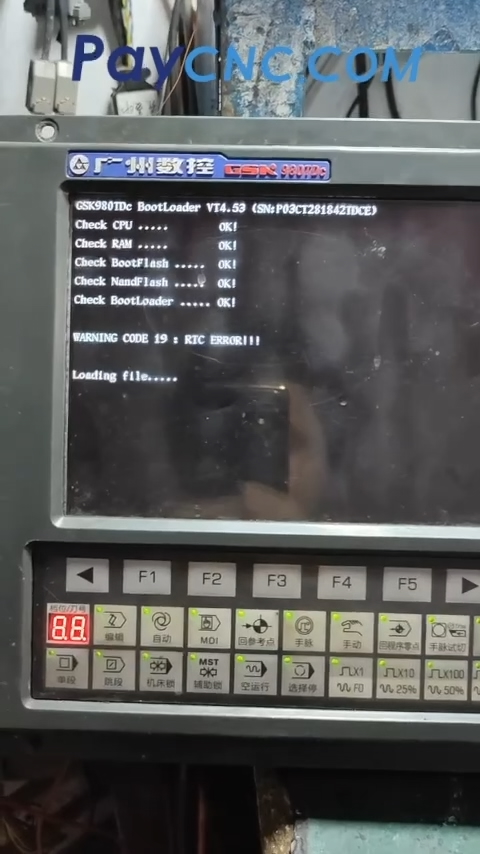
Common problems with the GSK980 series (including GSK980TD, GSK980TDa, GSK980TDb, GSK980TDc, GSK980MD, GSK980MDa, GSK980MDc, etc.) generally fall into several categories: startup failures, display issues, parameter loss, and drive alarms.
Below is a troubleshooting guide organized by symptom – common causes – what to check first, making it easier to diagnose problems.
1. Black Screen at Startup / System Fails to Boot
Common causes:
A depleted backup battery causing parameter loss, moisture-related corrosion or broken traces on the mainboard, or abnormal output from the internal power supply module.
What to check first:
Check whether the screen has a backlight when powering on (use a flashlight to see if there is a faint image). Also check whether the indicator lights on the keypad are illuminated. If the backlight is on but there is no image, the display cable or LCD may be the problem. If there is no backlight at all, check the power supply output first.
2. Repeated Reboots / Startup Stuck During Self-Test
Common causes:
Aging capacitors on the mainboard, corrupted Flash program data, or an internal short circuit (often caused by an external short circuit).
What to check first:
Disconnect all external I/O and drive connections, then power on the control by itself to rule out external short circuits. If the control reaches the self-test screen but gets stuck at “Loading Flash,” the program area may be corrupted and the system may need to be reflashed.
3. Lost Parameters, Programs, or Garbled Data
Common causes:
Low backup battery voltage, improper shutdown during a power failure, or aging memory chips.
What to check first:
Replace the backup battery and restore the parameters from a backup. If no backup is available, restoring the parameters can be quite difficult. This is one of the most important precautions to take with older CNC systems.
4. Drive / Servo Alarms (e.g., ALM Indicator On or Alarm Codes)
Common causes:
Poor contact in the encoder cable, deteriorated insulation on motor power cables, damaged internal drive components, or mismatched drive and motor parameters.
What to check first:
Record the exact alarm code and refer to the corresponding manual. Check the cables and connectors first before suspecting the drive itself.
5. Distorted Display, White Screen, Touchscreen or Keypad Malfunction
Common causes:
Loose or oxidized display cables, an aging LCD, or worn-out membrane keypad switches.
A white screen on the GSK980M is often associated with mainboard corrosion or broken circuit traces. Replacing the entire panel can be expensive (some video comments mention a cost of approximately RMB 7,000). In many cases, repairing the mainboard or display cable is worth checking first.
6. Communication / USB Transfer Problems
Common causes:
Incompatible USB drive format or capacity, incorrect RS232 wiring or baud rate settings, or oxidized connectors.
What to check first:
Try a smaller USB drive formatted in FAT32, and verify the baud rate and stop-bit settings.
General Troubleshooting Sequence
1. Check whether the power supply output is normal.
2. Disconnect external wiring and power on the control independently.
3. Record any alarm codes and refer to the manual.
4. Only then consider working on the mainboard or system software.
Always back up parameters and machining programs before performing any troubleshooting or repair.
Paycnc offers all kinds of GSK CNC controller spare parts.
If you could not find the exact model, you can send photos and nameplate to paycnc@paycnc.com to get quotation.
WhatsApp: https://wa.me/+8613925042139
#cnc #problem
Video on Youtube
Common problems with the GSK980 series (including GSK980TD, GSK980TDa, GSK980TDb, GSK980TDc, GSK980MD, GSK980MDa, GSK980MDc, etc.) generally fall into several categories: startup failures, display issues, parameter loss, and drive alarms.
Below is a troubleshooting guide organized by symptom – common causes – what to check first, making it easier to diagnose problems.
1. Black Screen at Startup / System Fails to Boot
Common causes:
A depleted backup battery causing parameter loss, moisture-related corrosion or broken traces on the mainboard, or abnormal output from the internal power supply module.
What to check first:
Check whether the screen has a backlight when powering on (use a flashlight to see if there is a faint image). Also check whether the indicator lights on the keypad are illuminated. If the backlight is on but there is no image, the display cable or LCD may be the problem. If there is no backlight at all, check the power supply output first.
2. Repeated Reboots / Startup Stuck During Self-Test
Common causes:
Aging capacitors on the mainboard, corrupted Flash program data, or an internal short circuit (often caused by an external short circuit).
What to check first:
Disconnect all external I/O and drive connections, then power on the control by itself to rule out external short circuits. If the control reaches the self-test screen but gets stuck at “Loading Flash,” the program area may be corrupted and the system may need to be reflashed.
3. Lost Parameters, Programs, or Garbled Data
Common causes:
Low backup battery voltage, improper shutdown during a power failure, or aging memory chips.
What to check first:
Replace the backup battery and restore the parameters from a backup. If no backup is available, restoring the parameters can be quite difficult. This is one of the most important precautions to take with older CNC systems.
4. Drive / Servo Alarms (e.g., ALM Indicator On or Alarm Codes)
Common causes:
Poor contact in the encoder cable, deteriorated insulation on motor power cables, damaged internal drive components, or mismatched drive and motor parameters.
What to check first:
Record the exact alarm code and refer to the corresponding manual. Check the cables and connectors first before suspecting the drive itself.
5. Distorted Display, White Screen, Touchscreen or Keypad Malfunction
Common causes:
Loose or oxidized display cables, an aging LCD, or worn-out membrane keypad switches.
A white screen on the GSK980M is often associated with mainboard corrosion or broken circuit traces. Replacing the entire panel can be expensive (some video comments mention a cost of approximately RMB 7,000). In many cases, repairing the mainboard or display cable is worth checking first.
6. Communication / USB Transfer Problems
Common causes:
Incompatible USB drive format or capacity, incorrect RS232 wiring or baud rate settings, or oxidized connectors.
What to check first:
Try a smaller USB drive formatted in FAT32, and verify the baud rate and stop-bit settings.
General Troubleshooting Sequence
1. Check whether the power supply output is normal.
2. Disconnect external wiring and power on the control independently.
3. Record any alarm codes and refer to the manual.
4. Only then consider working on the mainboard or system software.
Always back up parameters and machining programs before performing any troubleshooting or repair.
Paycnc offers all kinds of GSK CNC controller spare parts.
If you could not find the exact model, you can send photos and nameplate to paycnc@paycnc.com to get quotation.
WhatsApp: https://wa.me/+8613925042139
#cnc #problem